
Kart telemetry,
you can actually
Slicks is a kart telemetry app for iPhone, iPad and Mac. It opens AiM XRK files and shows sectors, corners and engine peaks.


Introducing Slicks
Between heats there’s no time to study a chart. Slicks opens the XRK file from your AiM logger and puts the answer on your phone: where you gained, where you lost, and what to change before you go back out.
Built for the ninety seconds between heats
There’s no time to study a chart. Slicks opens on the numbers that decide your next change, worked out on your phone from the session file. No signal needed.
Adria Kart
Lap 8, 49.765
Sector 1
14.749
Sector 2
17.498
Sector 3
17.373
Theoretical best
48.979
See where every tenth went
Sectors
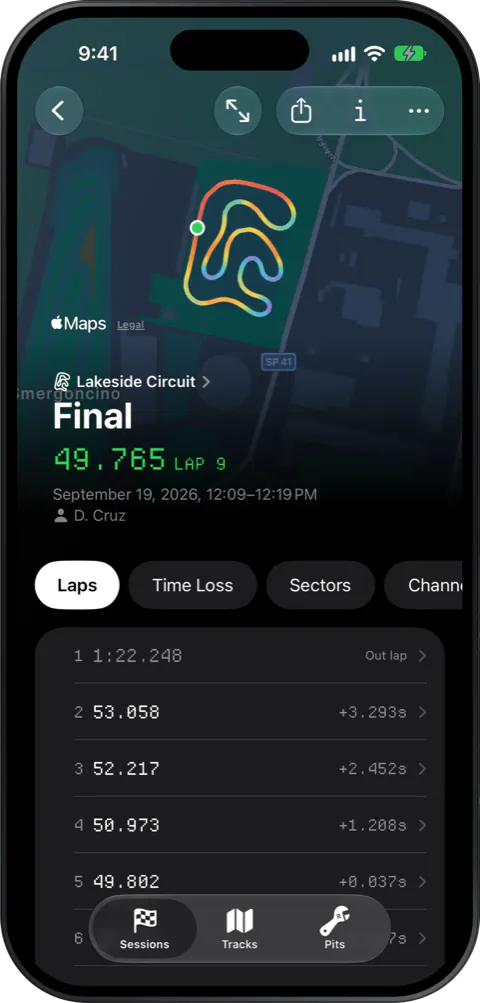
Every lap split into sectors against the session’s best.
Where the time went
The corners that cost you the most time, ranked by loss.
Laps
Every lap in the order you drove it, the fastest marked.
Engine
Peak RPM and temperatures against your tuner’s window.
Race any two laps against each other
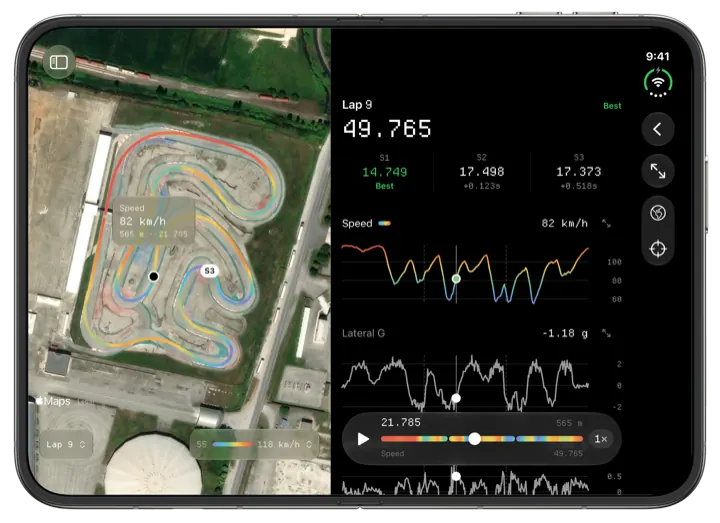
Pick two laps and Slicks runs them round the track together. Scrub to any corner to see who’s ahead, and by how much.
The track, as you drove it
Every session is drawn lap by lap over the real track. Colour the line by speed, lateral g, or any channel your logger recorded, then turn the dial to isolate a single lap.
Lap 8 ahead by 0.00 sLevel
- Lap 8 · 49.765
- Lap 9 · 50.316
Any track you race
Slicks maps the track from your own laps, so it works wherever there’s asphalt. If it’s in the circuit catalogue, Slicks also knows its name, layout and length.
One library, every device
Sessions sync through your account, and the summary works with no signal. Share a session with a coach by link, and revoke it whenever you like.
Import on the Mac
Drop in your logger file. It’s parsed on the spot and added to your library.
Read on the iPhone
The summary is waiting in the paddock, sectors and peaks first.
Compare on the iPad
At home, lay the same laps over each other. Nothing to copy or send.
Bring your own files
Slicks reads XRK and XRZ files straight from your AiM logger, with no AiM software needed. Drop one in on Mac, iPad or iPhone, and the track, driver and date fill themselves in.
- Track
- Red Bull Ring
- Lap
- 2
- Time
- 1:14.500
- Top speed
- 212.0 km/h
- Scale
- 1 px = … m
The specifics
- Files
- XRK and XRZ, as AiM loggers write them, parsed on the device
- Devices
- iPhone, iPad and Mac, one app, one library
- Requires
- iOS 26.6, iPadOS 26.6 or macOS 26.4
- Price
- Free on the App Store
- Sectors
- 2 to 10 per lap, equal distance, against the session’s best
- Overlays
- Speed, GPS-derived readings, any logged channel
- Compare
- Two laps: speed overlay, time delta, a cursor linked to the map
- Engine
- Peak RPM, exhaust and water temperatures against your tuner’s window
- Sync
- Every device you sign in on; the summary works offline
- Sharing
- One session by link, revocable; the file never leaves your account
- Units
- km/h or mph, °C or °F, on every reading
Questions
Which files does Slicks read?
The XRK and XRZ files AiM loggers record, MyChron included. Slicks parses them on the device itself; it needs no AiM software and no internet connection to open one.
How does a file get from the logger into Slicks?
Any way a file reaches your device: AirDrop, the Files app, a shared folder, or dragging it onto the Mac app. Getting the file off the logger in the first place still happens with AiM’s own tools.
Does it replace RaceStudio?
For reading a session, yes: laps, sectors, time lost by corner, engine peaks, track maps and two-lap comparison. Configuring the logger itself stays with AiM’s software.
Which devices does it run on?
iPhone and iPad with iOS or iPadOS 26.6 or later, and Mac with macOS 26.4 or later, as one app. Sessions sync between your devices.
Can I open XRK files on a Mac?
Yes. Slicks opens XRK and XRZ files on the Mac as well as on iPhone and iPad, with no AiM software installed: drop a file on the library’s sidebar or choose File › Import Sessions.
Is Slicks free?
Yes. Slicks is free on the App Store, one download for iPhone, iPad and Mac.
Does it need an internet connection at the track?
No. A session is parsed on the device itself, so the sectors, the theoretical best and the session summary are there with no signal; sync catches up once you are back online.
What does Slicks show about a session?
Every lap split into sectors against the session’s best and the theoretical best they add up to, the corners that cost the most time, engine peaks against your tuner’s window, the track map coloured by speed or any channel the logger recorded, and any two laps raced against each other with the gap between them.
Who can see my data?
You. Sessions are private to your account unless you share one by link, and a link can be revoked at any time. The original file is never reachable through a link.

Bring a session file
Download it and open one of your XRK files: your laps draw themselves the same way, on the tracks you race.