
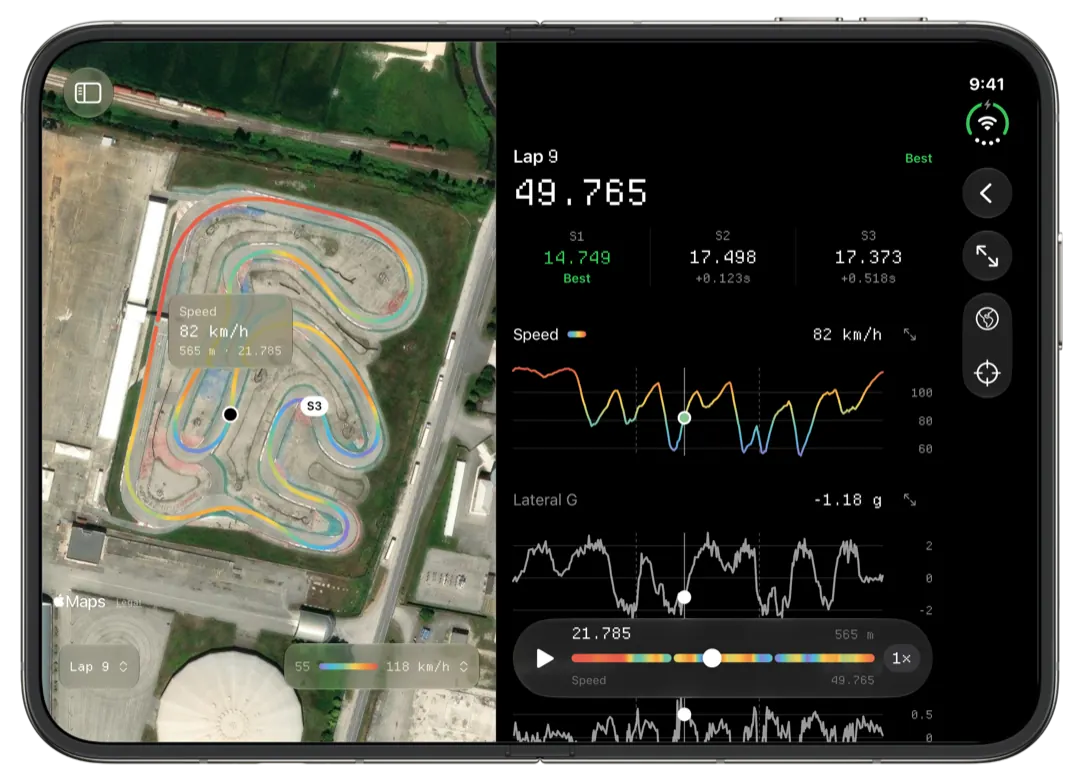
A karting coach can use Slicks to read a driver's AiM or MyChron session on an iPhone, iPad or Mac within a minute of the kart coming in: every lap split into sectors, the theoretical best, the three corners that cost the most time, and the engine's peaks against its window. The driver sends the file or a link; nothing needs a Windows laptop.
Why the laptop gets left in the van
Most coaching happens in the ten minutes between a session and the next one. That is not long enough to boot a laptop, download the logger, open RaceStudio, find the right lap and line two traces up, so a lot of coaching still runs on what the driver remembers and what the stopwatch said. The data was recorded. It just never got read in time.
Slicks is built for that window. It opens the session on the phone that is already in your pocket and leads with the answers a coach acts on, not with a chart to study.
What you see first
When a session opens, the top of the screen is the fastest lap drawn on the track in the colours of its speed, with the lap time and lap number under it. Under that, one page at a time:
- Laps: every lap with its gap to the fastest, the out lap marked, and how consistent the session was: the spread of the lap times and how many laps were within half a second of the best.
- Time Loss: the corners where the other laps lost the most against the fastest, ranked, with how many tenths, how much slower the slowest point was and whether the braking point moved. The list stops at three on purpose. Three is what a driver can take back out.
- Sectors: the lap split into sectors, the best time through each, and the theoretical best they add up to. The gap between that and the best lap is time the driver has already driven, in pieces.
- Setup: the engine's peak RPM, exhaust and water temperatures against the window for its engine, every channel's range, and what the driver wrote down about the kart.
Our guide to the theoretical best lap explains how to use that gap in a debrief.
Getting the session from the driver
There are two ways, and they suit different coaches.
A link. From the session's Share menu the driver sends you a link. It opens in any browser as a read-only page: the best lap, the sectors against the best in each, the theoretical best, the engine's peaks, consistency, the setup and the driver's notes. You need no app and no account. The driver can stop sharing at any time, and the original file is never reachable through the link. This is the fastest way to see whether a session went to plan.
The file. For the full analysis, the driver sends the session itself (Send File in the same menu, or the XRK or XRZ file however they like: AirDrop, Messages, a shared folder). Open it in Slicks and it sits in your own library, synced to your iPad and Mac, with everything the driver sees: every lap, the track map coloured by speed, g, RPM or temperature, and lap comparison.
Running a debrief from it
A routine that fits between heats:
- Best lap against the theoretical best. How big is the gap, and is it shrinking through the day? A gap that will not close is a consistency problem, not a speed problem.
- The first corner on the Time Loss list. Open it in Compare: the lap that lost the most there, raced against the fastest, with the gap drawn along the lap. Look at where the gap starts to grow, not where it is biggest. The full method is in our beginner's guide to reading kart telemetry.
- Engine peaks. If peak RPM or the exhaust temperature is outside the window, that is the mechanic's conversation before it is the driver's.
- One thing to try. Write it in the session's notes, so the next session's data says whether it worked.
On an iPad or a Mac you have room for more: the lap screen charts every reading the logger recorded against one distance axis, with a cursor that runs round the map as you scrub, and playback at one, two or four times real speed.
For coaches with several drivers
Every driver keeps their own sessions in their own account and shares what they choose. A coach with a roster ends up with a link per session, or a library of the files drivers sent, grouped by track and weekend. The Tracks tab keeps every session by circuit, with the personal best there, so you can see how a driver's best at one track has moved over a season.
What Slicks does not do for a coach: it does not compare two drivers' separate sessions against each other, and it does not sync video. If both drivers ran one kart with one logger, their laps are in the same file and can be compared like any two laps.
