
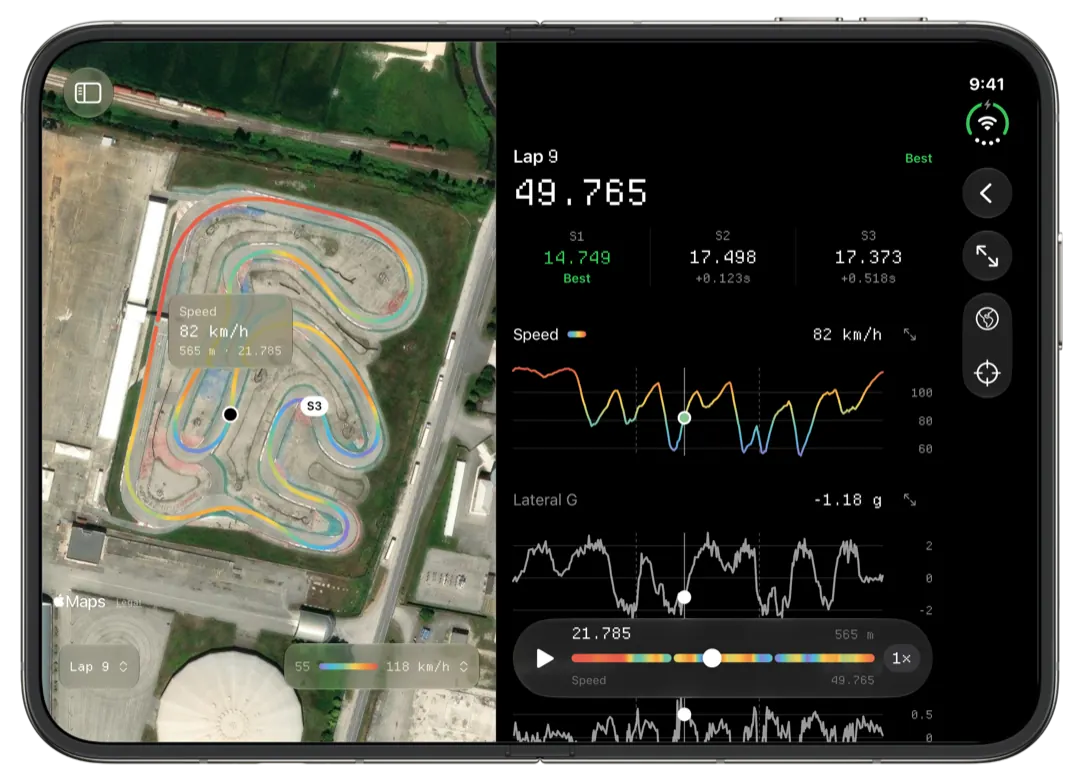
Slicks reads the sessions a MyChron 6 records, as XRK or XRZ files, and shows them on an iPhone, iPad or Mac: your fastest lap on the map, sectors and the theoretical best, the corners that cost you most, engine peaks against your window, and two laps raced against each other. It reads the file on the device, with no AiM software and no signal needed.
What the MyChron 6 brings
AiM announced the MyChron 6 in December 2024 and it shipped early in 2025. Next to the older loggers, the spec sheet lists:
- 25 Hz GNSS: a position fix 25 times a second.
- A 50 Hz six-axis IMU: a motion sensor measuring acceleration and rotation.
- USB-C, alongside Wi-Fi and Bluetooth, for getting data off it.
- 4 GB of memory and a battery rated for 20 hours.
The file format did not change. A MyChron 6 still saves each session as an XRK file, compressed to XRZ when RaceStudio 3 downloads it. That is why a 6 works in Slicks the same way a 5 does.
What 25 fixes a second means on a kart track
Most of what you read in kart data comes from the GPS: speed, your line, where you braked, the sectors, the gap between two laps. So the rate of the fixes matters more than any other number on the box.
At 25 a second, a kart doing 100 km/h gets a fix about every 1.1 metres. Through a hairpin at 40 km/h it is one every 0.45 metres. Two places in Slicks lean on that density most:
- Time Loss ranks the corners that cost you most and gives each one the speed you were down at the slowest point and how many metres earlier or later you braked. The closer together the fixes, the less a minimum speed depends on where between two fixes the slowest moment fell.
- Compare puts two laps on one distance axis and draws the gap between them along the lap. More fixes per corner gives the gap more points to follow through it.
A faster GPS is still GPS. Under trees and next to tall buildings the line wanders. Read the big shapes, not every small kink. Our beginner's guide to reading kart telemetry says which shapes to look for.
Getting a session from a MyChron 6 to your phone
Slicks does not download from the logger, USB-C included. The session comes off with AiM's tools:
- USB-C to a Windows laptop running RaceStudio 3. A cable avoids joining the logger's Wi-Fi network.
- Wi-Fi, to RaceStudio 3 on Windows or to AiM's RaceStudio 3 app on an iPhone or Android phone.
From there, AirDrop, the Files app, Messages, a shared folder or a USB stick gets the file to Slicks. On a Mac you can drag it onto the sidebar or use File › Import Sessions… (⌘O). Bring in a single new session and Slicks first asks what you changed on the kart, before any numbers, so the change is written down while you still remember it honestly.
How Slicks reads the forces
Slicks works out lateral g and longitudinal g from the GPS track, the same way for every logger. A cornering reading from your MyChron 6 means the same thing as one from an older MyChron 5 file. That matters if you upgraded mid-season and want to look back at last year at the same circuit.
Every channel the logger wrote to the file shows up on the Setup page with its lowest and highest reading, and on the Mac any of them can colour the track map. The lap screen charts each reading against one distance axis with one cursor across all of them and the map, so the moment your speed drops and the moment the braking force rises line up on the screen. Our page on g-force analysis goes into what to look for.
Settings for the motion sensor itself, such as the steering-angle calculation AiM added in 2025, are part of setting up the logger, and that stays in RaceStudio 3.
Moving from a MyChron 5 to a 6
Your old sessions come with you. Import the 5's files and the 6's into the same library and the Tracks tab puts every session at a circuit together, with your best there at the top, whichever logger recorded it. If you still have a folder of old downloads, our page on opening XRZ files covers bringing them in at once.
One limit to know: Slicks compares two laps from the same session. A lap from your MyChron 5 last summer and one from your MyChron 6 this week sit in different files, so you read them side by side, not overlaid.
A few things a MyChron 6 owner might expect and will not find: Slicks does not use the logger's USB-C port, Wi-Fi or Bluetooth, it does not set the logger up, and it does not sync video from a SmartyCam 4. It reads what the MyChron 6 recorded, and nothing more.
