
Slicks on iPad shows a kart session with room to spare: your sessions in a list beside the one you are reading, an inspector column with the notes, the engine's peaks and the kart's setup, a laps table and a lap-trend chart. It opens AiM and MyChron XRK files from Files or AirDrop, works offline at the track and is free.
Why an iPad at the track
A phone answers one question at a time. A laptop answers everything, once it has booted, found a power socket and dodged the rain on the bench. An iPad sits in between, and for a lot of teams it is the right size for the pits: big enough to show the laps, the map and the engine together, small enough to carry to the grid, and awake the moment you open the cover.
Getting a session onto it is the same as on a phone. The file comes off the logger with AiM's own tools, then reaches the iPad by AirDrop, a shared folder or the Files app, and Slicks opens it on the device. A shared folder is handy when one person in the team downloads the logger: everyone else picks the file up from there on their own iPad or phone.
The session list beside the session
In landscape, and in a wide window, Slicks lays out as a split view: your sessions down the side and the one you picked filling the rest. Tap the next session and it opens in place, so you can step through a weekend without going back and forth. When the window narrows, in Split View beside another app for example, it folds back into a single column, like the phone.
The inspector column
When there is room, the session gets a third column on its right: the inspector. It holds the session's notes, the engine's peaks against their window, the kart's setup and every channel's range. A button in the toolbar shows or hides it, and Slicks remembers your choice.
The point is to keep the engine and the setup in view while you work through the laps. Tap from lap to lap in the main column and the peak RPM, the exhaust temperature and the sprockets the kart ran stay put beside them. When the window is too narrow for a third column, the same sections sit inline in the session, as on a phone.
The laps table and the trend chart
On iPad the Laps page has room for two things the phone leaves out:
- A lap-trend chart. Every lap's time across the session, so a driver who faded, or who only found pace once the tires came in, stands out at a glance.
- A laps table. The laps in columns rather than cards, easier to scan when a session runs to twenty laps or more.
Consistency sits with them: how spread out the lap times were, and how many landed within half a second of the best.
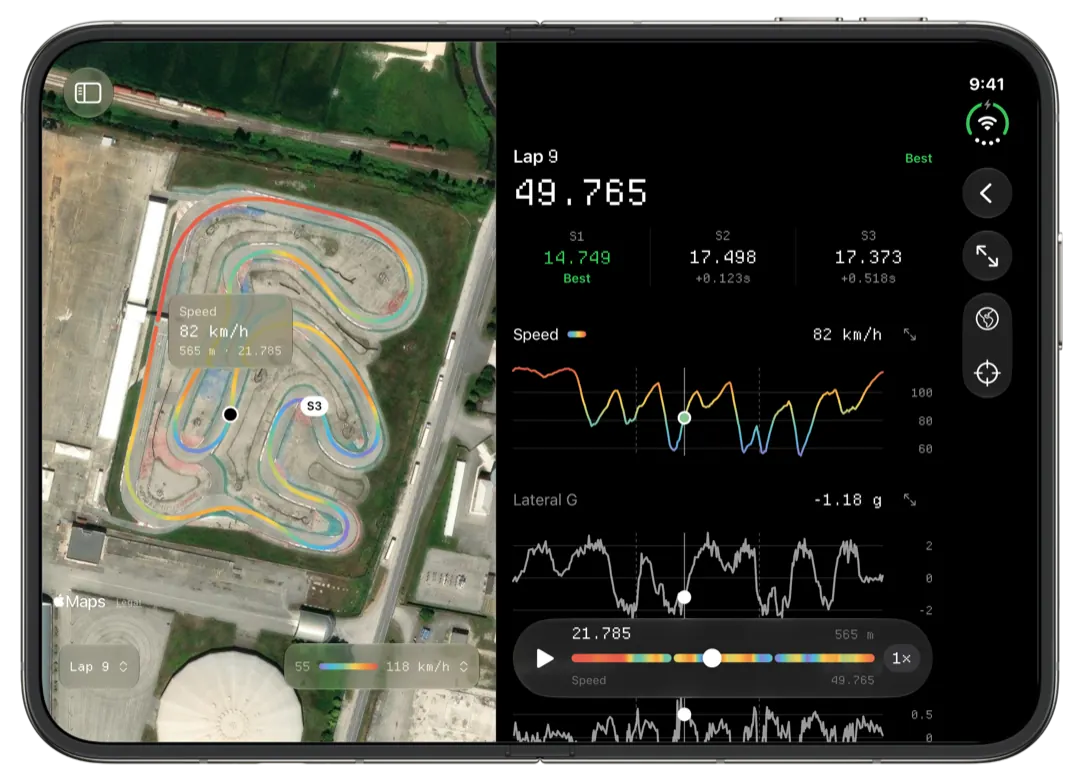
Tap a lap and the lap screen sets its map beside its charts when there is room: every reading the map can be coloured by against one distance axis, with one cursor across the charts and the map, and playback at 1×, 2× or 4×. Holding the map reads the exact value at a point, and any chart opens full screen.
More than one window
Slicks can open a session in a window of its own, from the session's menu or the list. With two windows side by side you can read Saturday's practice next to Sunday's warm-up, or one driver's session next to their teammate's. Slicks compares two laps on one chart only when they are in the same session, so two windows are the way to read two sessions together. On the lap comparison page you'll find what Compare shows within one session.
iPhone Duo too
Slicks also runs on iPhone Duo, the foldable iPhone. Closed, it is a phone; open, there is room to work the way this page describes. If you mostly carry a phone, the iPhone page covers Slicks at that size.
What Slicks on iPad does not do: it does not download from the logger or configure it, and it cannot overlay laps from two separate sessions on one chart.
