
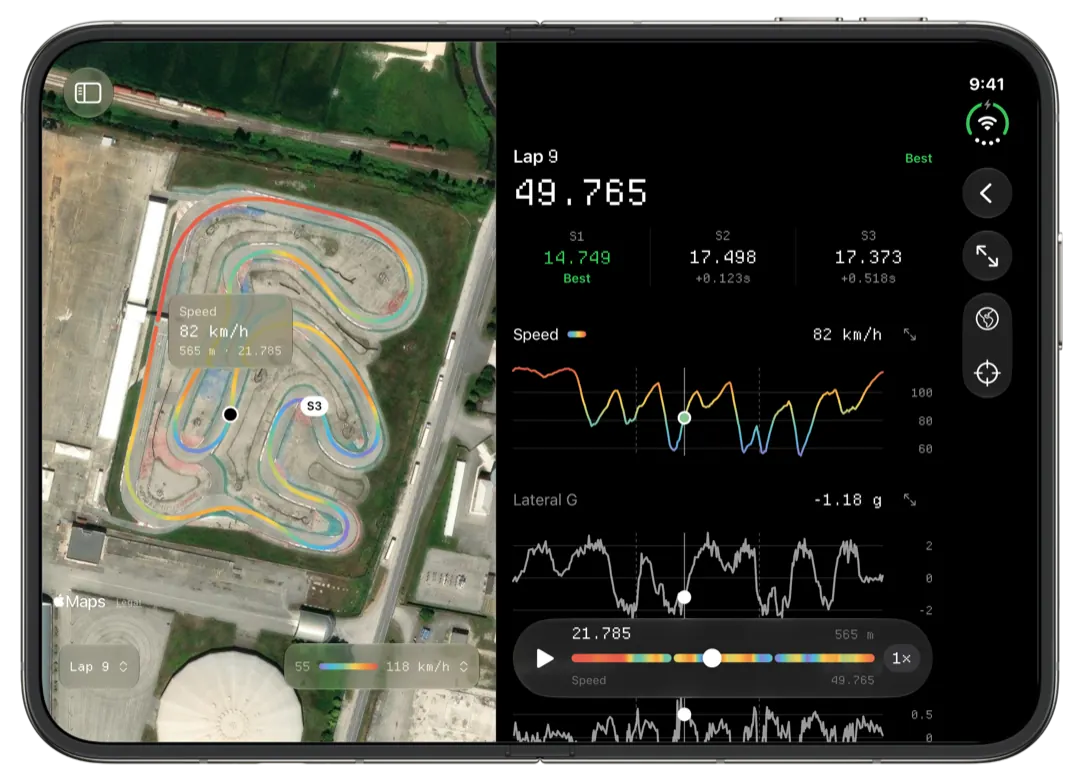
Slicks is an alternative to RaceStudio 3 for reading AiM sessions, not for running the logger. RaceStudio 3 sets up the logger, downloads it and has the deepest analysis toolset for AiM data, on Windows. Slicks opens the same XRK and XRZ files on an iPhone, iPad or Mac and leads with what to change before the next session.
What RaceStudio 3 is best at
RaceStudio 3 is AiM's own free software for 64-bit Windows, and some jobs only it does:
- Setting up the logger. Channels, alarms, tracks: all of it.
- Downloading sessions, over the logger's Wi-Fi or a cable.
- Analysis in depth. Time and distance plots with as many channels as you like, scatter plots, histograms, split reports, math channels, a predictive reference lap you can send to the logger, and sessions from different files and loggers overlaid.
- Video, synced automatically with AiM's SmartyCam.
- Exports, including CSV.
Since May 2026 AiM also has a RaceStudio 3 app for iPhone and Android, for downloading and viewing sessions straight from the logger.
If you are an engineer building math channels, a team comparing two drivers' separate sessions, or you sync on-board video, RaceStudio 3 is the tool and nothing here changes that.
What Slicks is for
Slicks is built around the gap between two sessions, when you have a few minutes and a phone. It opens a session on the numbers you act on: the sectors and the theoretical best, the three corners that cost the most time with the tenths and the braking point shift in metres, and peak RPM, exhaust and water temperatures against your engine's window.
It runs on the Apple devices you already carry, one app for iPhone, iPad and Mac. It reads files on the device, so it works with no signal. A free account syncs every session between your devices, and a link shows a session to anyone with a browser. The deeper tools, two laps raced against each other and every channel against one distance axis, are a tap further in.
Side by side
| RaceStudio 3 | Slicks | |
|---|---|---|
| Runs on | 64-bit Windows; AiM's app on iPhone and Android | iPhone, iPad and Mac |
| Sets up the logger | Yes | No |
| Downloads from the logger | Yes | No |
| Files it reads | AiM's own formats | XRK and XRZ |
| Analysis | Plots of any channels, scatter, histograms, split reports, math channels, predictive lap | Sectors, theoretical best, time loss by corner, two-lap compare, map coloured by speed, g, RPM and temperatures (any channel on the Mac), engine windows |
| Between heats | A full workspace on the laptop; lap times and charts in AiM's app | Opens on the answers, on the phone |
| Comparing laps | Laps from different sessions and loggers | Two laps from the same session |
| Video | SmartyCam sync | None |
| Export | CSV and others | Sends the XRK file itself |
| Sharing | AiM Cloud, with other AiM accounts | A read-only web link anyone can open, revocable |
| Price | Free | Free |
Using both
For most AiM owners this is the honest answer. A routine that works:
- Configure and download with AiM's tools. RaceStudio 3 on a Windows laptop, or AiM's phone app. Set the logger up once a season and leave it.
- Get the file to Slicks. AirDrop, the Files app, a shared folder such as iCloud Drive, Dropbox or Google Drive, or a USB stick.
- Read it on the phone between sessions. Sectors, the corner at the top of the Time Loss list, engine peaks. Write down what you change.
- Go deep in RaceStudio 3 when you need it. A test day, a setup question that needs math channels, a comparison against a teammate's session, an evening with the video.
The files stay AiM's format the whole way through, so nothing you do in one locks you out of the other.
When RaceStudio 3 alone is the right answer
Be honest with yourself about these:
- You use Windows or Android and no Apple devices. Slicks is Apple only.
- You live in math channels, scatter plots or histograms. Slicks has none.
- You compare against other sessions or other drivers. Slicks compares two laps within one file.
- You need CSV. Slicks does not export it.
- Your logger is a car logger with dozens of channels you analyse together. Slicks shows them, but it is built around what a kart session needs.
If you are on a Mac, our page on RaceStudio 3 for Mac owners lays out every way to get the downloading done. If you want to know what Slicks does with two laps, see lap comparison.
What Slicks does not do, compared with RaceStudio 3: set up or download the logger, live telemetry, video sync, math channels, CSV export, comparing sessions or drivers across files, Windows or Android.
