
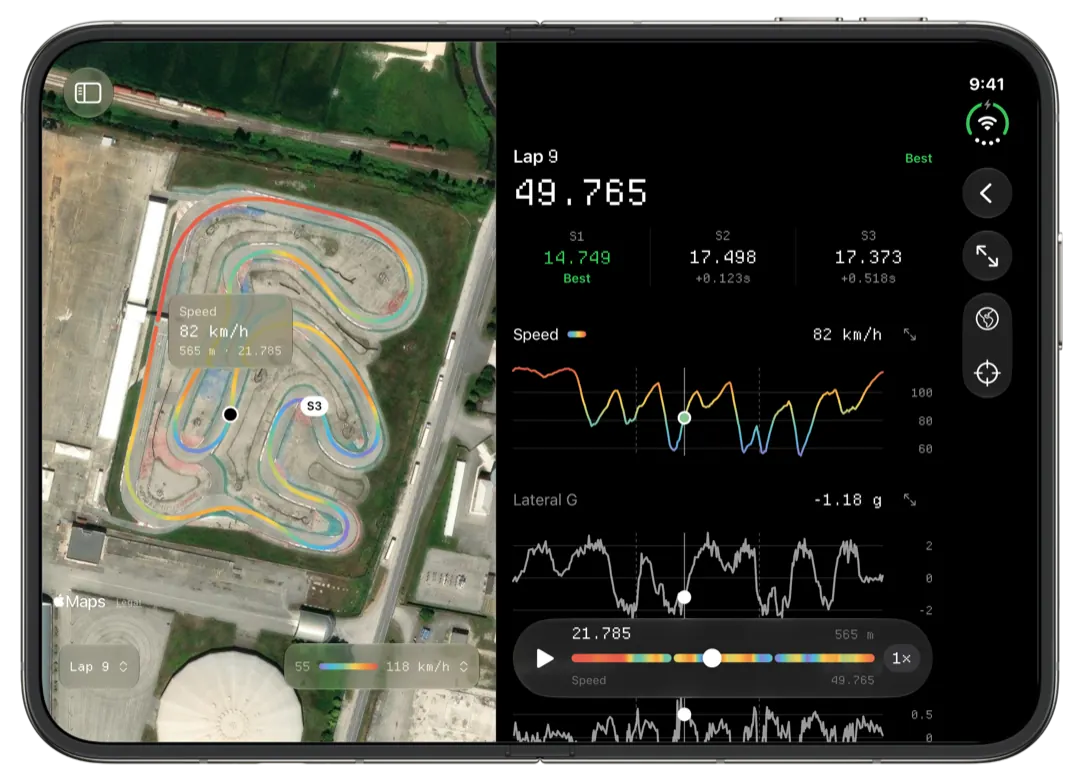
An XRK file is a session recorded by an AiM logger, MyChron included, in AiM's own binary format. Two apps read one: AiM's RaceStudio 3 on Windows, and Slicks on a Mac, iPhone or iPad. Slicks opens XRK and XRZ files on the device with nothing from AiM installed and shows the laps, sectors, track map and every channel.
What an XRK file holds
An XRK file is not a spreadsheet and not a video. Open one in a text editor and you get noise with a few readable words in it. Inside, it is a series of labelled blocks:
- A header with the driver, the vehicle, the track and the date and time the session was recorded.
- A definition for every channel: its name, its units and how often the logger sampled it.
- The samples, channel by channel, for the whole session.
- The GPS fixes: where the kart was, and how fast it was moving, many times a second.
- The laps, from each time the logger crossed the start line.
A MyChron usually fills that with GPS, RPM and one or two temperatures. AiM's other loggers fill it with whatever they are wired to. An XRZ file is the same thing compressed. Our page on XRZ files covers where RaceStudio 3 keeps them.
Which apps open an XRK file
| App | Runs on | What it is for |
|---|---|---|
| RaceStudio 3 | 64-bit Windows | AiM's own: sets up the logger, downloads sessions, deep analysis |
| RaceStudio 3 app | iPhone, Android | AiM's own: downloads and views sessions from the logger |
| Slicks | iPhone, iPad, Mac | Reads the file on the device and leads with what to change |
Nothing built into macOS, iOS or Windows opens one, and neither does Excel or Google Earth. If you are on a Mac and want the step-by-step version, with screenshots, our post on how to open AiM XRK files on a Mac walks through it.
Where each part of the file shows up in Slicks
Every screen in Slicks is one of those blocks drawn a different way:
| In the file | Where you see it |
|---|---|
| Header | The track, driver and date at the top of the session, and its place in the Tracks tab |
| Laps | The Laps page: every lap, its gap to the fastest, the out lap marked, consistency |
| GPS fixes | The track map in the colours of speed, the sectors, the theoretical best, the Time Loss ranking, lateral and longitudinal g |
| Channels | The Setup page's lowest and highest reading for each, the engine peaks against your window, and as a colour on the map (RPM and temperatures everywhere, any channel on the Mac) |
| Samples over time | The lap screen's charts on one distance axis, with one cursor across them and the map |
On a Mac there is one more view of the raw channels: the Channels tab lists every channel in a table with a small sparkline, and charts the one you pick over time or distance, with a cursor you move with the pointer, zoom and a delta mode. It is the closest Slicks gets to looking straight at what the logger wrote.
What an XRK cannot be turned into in Slicks
Slicks reads XRK files. It does not convert them.
- No CSV. There is no export to CSV or a spreadsheet. If you need the numbers in a spreadsheet, RaceStudio 3 on Windows exports CSV.
- No editing the recording. Slicks will not trim laps out of a file or merge two files into one.
- No comparing two files. Two laps can be raced against each other only when they are in the same session.
What it can send on is the file itself: Send File in the session's Share menu hands over the XRK. Share Link sends a read-only web page of the session instead, for someone who has no app.
When an XRK file will not open
Check three things first:
- The ending. It must be
.xrkor.xrz. A.drkfile is from RaceStudio 2, and files from Alfano, Unipro, RaceBox and other brands are different formats that Slicks does not read. - The whole file. A copy that was interrupted can be missing its end. Copy it across again from where it was first downloaded.
- Which logger wrote it. If it is not a MyChron, note the model. It helps when you report it.
If it still will not open, our support page says where to send it. A file that will not open is one we want to see.
No file to hand? Open Slicks with an empty library and tap Try a Sample Session. It is a real session, so you can see everything above before you dig out a file of your own.
